Your analysts already have more alerts than they can read. Normalize the text before it reaches them.
Sentiqra turns reported phishing, social-engineering, and threat text into structured signals that route cleanly into your SIEM, SOAR, and analyst workflows - no human read first.
Who it's for
Security engineer
Integrate normalized signals into SIEM, SOAR, or internal workflows.
SOC manager
Prioritize analyst attention and make triage logic more consistent.
Security governance
Preserve configuration and verification evidence behind automated analysis.
Strong fit if
- Inbound messages or alerts need triage
- Lures and credential threats reach your users
- Security tooling needs structured signals, not prose
The pipeline
Sentiqra supplies the evidence. Your systems decide what happens next.
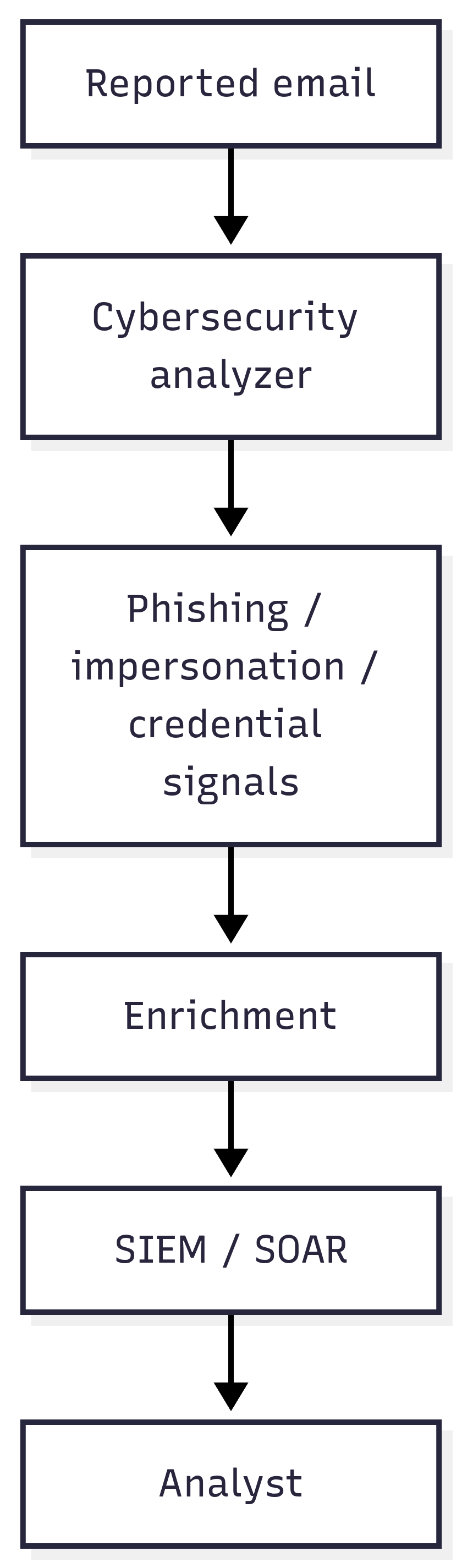
Sentiqra does not make the final decision. It supplies structured signals to the systems that do.
Stored with every decision
Request ID · configuration ID · fingerprint · policy version · action taken
You control: siem / soar routing rules · analyst triage and escalation · incident response and blocking
Before Sentiqra / With Sentiqra
| Before | With Sentiqra |
|---|---|
| Free-form alert text | Normalized threat signals |
| Manual interpretation | Machine-readable indicators |
| Opaque routing | Explicit signal → workflow mapping |
What you receive
Not a generic "unsafe" flag - structured signals your policy engine can route on.
- Phishing, impersonation, and credential-threat signals
- Confidence scores per signal
- Versioned configuration and fingerprint
Cybersecurity - response preview · illustrative
Three workflows this powers
1
Reported-phishing triage
An MSSP normalizes tens of thousands of user-reported emails per day into threat signals before an analyst ever opens one - the queue is prioritized, not just longer.
2
Threat-intel normalization
Turn vendor reports, OSINT, and analyst notes into searchable, structured indicators that feed the same taxonomy.
3
Security-aware ticket escalation
Detect account-access and credential-risk signals in customer tickets before normal support handles them - the security case never sits in the wrong queue.
What the first 30 days look like
Week 1
Pipe a sample of inbound alerts/reports through the API - first structured signals flowing within the week.
Week 2
Map signal codes to your SIEM/SOAR routing rules (Splunk, Sentinel, or XSOAR playbooks).
Week 3
Tune thresholds on shadow traffic, then dark-launch on one alert class.
Week 4
Cut the first triage lane over; keep receipts for every auto-routed case.
Deterministic by construction, provable by receipt.
A signed verification receipt - configuration ID (sqcfg_...), result fingerprint (fp2_...), input commitment (ic3_...), and Ed25519 signature (sig_ed25519_...) - ships with every successful analysis result. Pin it to the stored decision and a later replay under the same supported configuration and output profile yields the identical canonical result - the difference between "the model said so" and evidence.
Proof
Security buyers expect quantified outcomes. The published eval: 147-150 generated test cases per language across 15 languages, Production Top-3 85.3-96.6% - and every benchmark row is tied to a configuration ID you can replay.
Cybersecurity benchmarksCybersecurity on every plan - from Free (5K runs/mo) to Enterprise. See pricing →
Prove fit on your own data.
A 30-minute evaluation path: export real examples, run in parallel, compare signal quality, and replay the receipts.
- 1. Export 100-500 real examples from your workload - including the hard cases.
- 2. Label each with the outcome you actually want (route / hold / allow).
- 3. Run them through the free tier against the analyzers on this page.
- 4. Compare our signals to your labels - where we agree, where we miss.
- 5. Tune your thresholds on the misses, re-run, and confirm the improvement.
- 6. Replay the receipts to confirm identical results - that's your audit trail.
Often paired with: Phishing & Account Protection (the account-takeover-specific workflow) · Multi-Domain Orchestration (staging Cybersecurity behind a primary screen)
Most SOC teams start with this page and add Phishing & Account Protection within a month - account-takeover lures are the highest-volume subset of what this analyzer already flags.
5,000 analyzer runs/month · No card required