Account takeover costs far more to remediate than to prevent. Catch the lure in the message, not the compromise in the log.
Detect credential lures, urgency pressure, and impersonation in email, chat, and support channels - then route them into warn, verify, or block workflows.
Who it's for
Security engineer
Wire lure signals into protection workflows.
Detection engineer
Feed lure signals into the SEG/EDR and identity stack with a receipt per detection.
Account-protection lead
Catch takeover attempts at the message layer.
Strong fit if
- Inbound messages or alerts need triage
- Lures and credential threats reach your users
- Security tooling needs structured signals, not prose
The pipeline
Sentiqra supplies the evidence. Your systems decide what happens next.
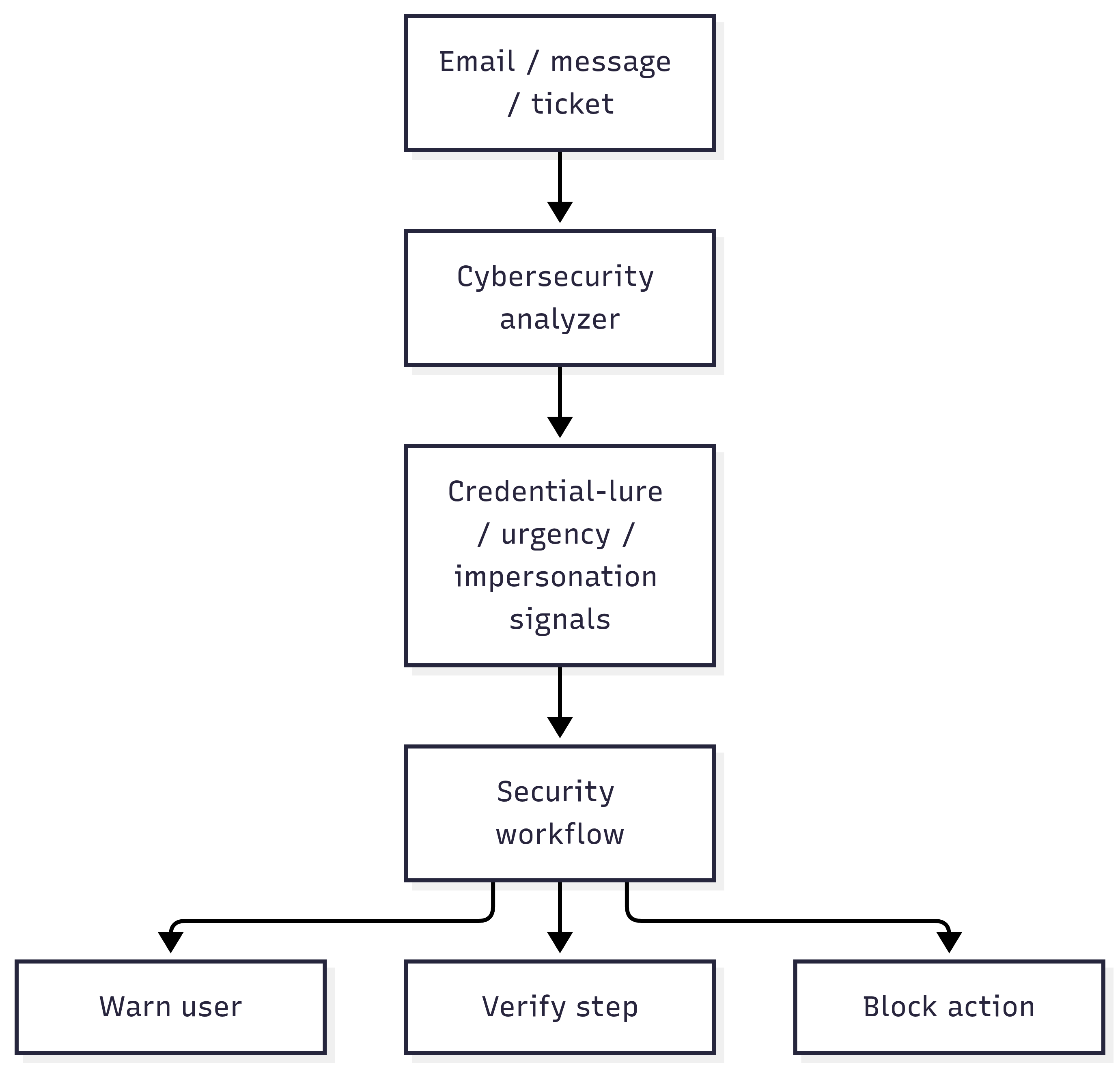
Sentiqra does not make the final decision. It supplies structured signals to the systems that do.
Stored with every decision
Request ID · configuration ID · fingerprint · policy version · action taken
You control: user warnings and verification steps · account protection and blocking rules · security escalation workflows
Why the secondary signal matters
A phishing-only label can hide a reported access concern. Your workflow can preserve both qualifying groups for investigation instead of treating the message as only a lure.
Illustrative workflow, not a measured detection
“The email requested my password. I entered it, and now there are sign-ins I do not recognize.”
Analyzer: cybersecurity. This example shows a possible policy mapping, not a guaranteed response for this text.
If these signals qualify
Phishing Delivery
Your policy could
Route the reported message to phishing review.
If these signals qualify
Access Identity
Your policy could
Ask the account-protection team to check sign-in telemetry.
Both groups belong to the Cybersecurity analyzer. Credential-lure and urgency child labels are not separate groups. Text signals do not confirm compromise; account checks happen in your own systems. Sentiqra does not execute these actions. Fewer groups or no groups may qualify, and reduced output profiles can omit signals.
Before Sentiqra / With Sentiqra
| Before | With Sentiqra |
|---|---|
| Reactive account recovery | Proactive lure detection |
| Opaque flag | Named threat mechanism |
What you receive
Not a generic "unsafe" flag - structured signals your policy engine can route on.
- Credential-lure, urgency, and impersonation signals
- Confidence scores per signal
- Versioned configuration and fingerprint
Cybersecurity - response preview · illustrative
Three workflows this powers
1
Warn before the click
Insert a warning interstitial when a message carries credential-lure or urgency signals.
2
Step-up verification
Feed the verify branch into MFA challenges or identity checks instead of a flat block.
3
Block the confident cases
Reserve automatic blocking for cases your validated policy approves - everything else warns or verifies first.
Confidence to action
You set the thresholds - this is the mapping most deployments start from. Automatic adverse actions (block, restrict, deny) belong behind a customer policy validated on your own traffic, with a review path for consequential decisions.
| score ≥ 0.95 | Block - only under a policy validated on your traffic; false-positive cost is lower than a compromised account |
| score 0.75 - 0.95 | Verify - step-up MFA or identity challenge before the action proceeds |
| score 0.55 - 0.75 | Warn - interstitial warning, message delivered with friction |
| score < 0.55 | Allow - below your alerting floor; log for threshold tuning |
Every result is a receipt.
Every successful analysis result includes a signed verification receipt: a configuration ID (sqcfg_...), a result fingerprint (fp2_...), an input commitment (ic3_...), and an Ed25519 signature (sig_ed25519_...). Store them. Replay the same input under the same supported configuration and output profile and you get the same canonical result - that's how appeals hold up, audits close, and regulators get straight answers.
Proof
The intercept model is the point: warn, verify, or block are three different actions with three different costs - the signals let you choose per case.
Cybersecurity on every plan - from Free (5K runs/mo) to Enterprise. See pricing →
Prove fit on your own data.
A 30-minute evaluation path: export real examples, run in parallel, compare signal quality, and replay the receipts.
- 1. Export 100-500 real examples from your workload - including the hard cases.
- 2. Label each with the outcome you actually want (route / hold / allow).
- 3. Run them through the free tier against the analyzers on this page.
- 4. Compare our signals to your labels - where we agree, where we miss.
- 5. Tune your thresholds on the misses, re-run, and confirm the improvement.
- 6. Replay the receipts to confirm identical results - that's your audit trail.
Often paired with: Security Operations (the broader SOC normalization layer) · Marketplace & Messaging Safety (lures inside conversations)
The usual deployment: Security Operations normalizes the full alert stream, this workflow handles the account-takeover subset with stricter thresholds.
5,000 analyzer runs/month · No card required