Stop payment fraud before the money moves.
Screen every payment request for CEO fraud, fake invoices and bank-detail changes - right inside your approval flow. Release, verify or hold, with a signed receipt on every check.
Who it's for
Head of Product
Add a fraud-screening feature to your AP or payments product with one API call.
Risk & fraud lead
Set release, verify and hold rules per customer tier and payment amount.
Finance controls & audit
Get a verifiable record of what every payment request was screened for.
Strong fit if
- Inbound messages or alerts need triage
- Lures and credential threats reach your users
- Security tooling needs structured signals, not prose
The pipeline
Sentiqra supplies the evidence. Your systems decide what happens next.
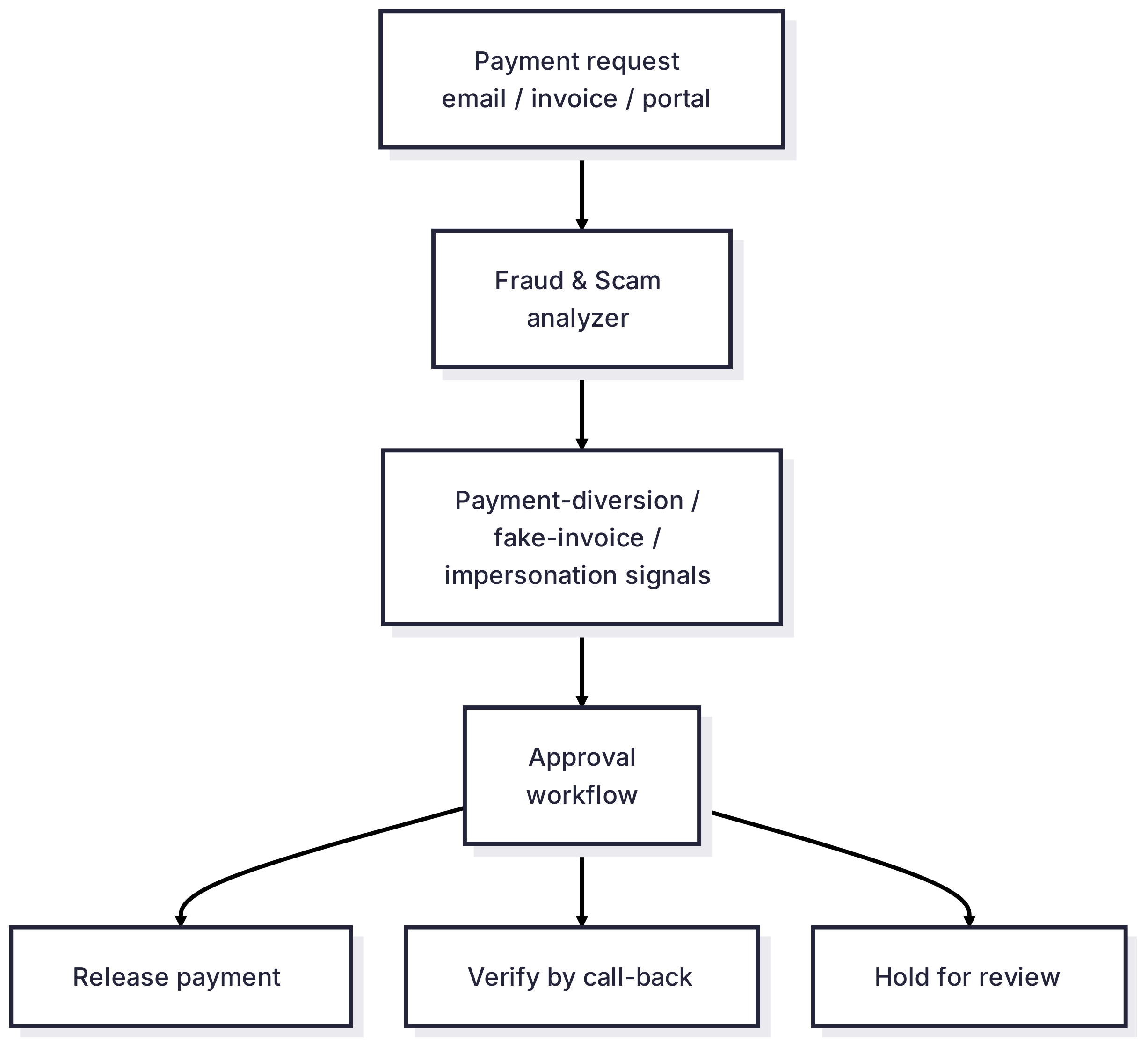
Sentiqra does not make the final decision. It supplies structured signals to the systems that do.
Stored with every decision
Request ID · configuration ID · fingerprint · policy version · action taken
You control: release, call-back verification and hold rules · thresholds per amount, vendor or approval tier · who reviews held payments, and how evidence is filed
Before Sentiqra / With Sentiqra
| Before | With Sentiqra |
|---|---|
| Approvers rely on gut feeling | Fraud cues shown at the moment of approval |
| Bank changes accepted by email | Every bank change verified by call-back |
| "Did anyone check this?" | A signed receipt on every payment |
What you receive
Not a generic "unsafe" flag - structured signals your policy engine can route on.
- Named fraud signals: payment diversion, fake invoice, impersonation
- A confidence level per signal, ready for your thresholds
- A signed receipt for every screened request
Fraud & Scam Detection - response preview · illustrative
Three workflows this powers
1
Warn at approval
Highlight the fraud cues to the approver when a request carries payment-diversion or impersonation signals.
2
Call back on bank changes
Any request that changes payment details is verified on a known contact before money is released.
3
Hold the confident cases
Hold only the highest-confidence requests for human review, behind a policy you validated on your own payment history - everything else warns or verifies.
Why the secondary signal matters
A bank-change-only flag misses the pressure in the message. Your workflow can keep both qualifying categories and send the request to call-back verification rather than paying or rejecting on the text alone.
Illustrative workflow, not a measured detection
“This is Nordline Supplies. Our bank has changed - please use the new account below for this and all future invoices, and keep this between us until our audit closes.”
Analyzer: fraud-scam. This example shows a possible policy mapping, not a guaranteed response for this text.
If these signals qualify
Payment Diversion
Your policy could
Hold the payment and verify the new bank details by calling a number already on file.
If these signals qualify
Impersonation
Your policy could
Check that the message really comes from the supplier before releasing any payment.
Both categories belong to the Fraud & Scam analyzer. Text signals do not confirm fraud and cannot check sender domains, headers or bank records - those checks stay in your own systems. Sentiqra does not execute these actions. Fewer categories or no categories may qualify, and reduced output profiles can omit signals.
Confidence to action
You set the thresholds - this is the mapping most deployments start from.
Automatic adverse actions (block, restrict, deny) belong behind a customer policy validated on your own traffic - signals are inputs to human review, not decisions by themselves.
| score ≥ 0.95 | Hold - payment paused for human review, under a policy validated on your own payment history |
| score 0.75 - 0.95 | Verify - call-back on a known contact before the payment is released |
| score 0.55 - 0.75 | Warn - approver sees the found cues, payment proceeds with friction |
| score < 0.55 | Release - below your alerting floor; log for threshold tuning |
What the first 30 days look like
Week 1
Week 1 - run a sample of your past payment requests through the API and see what gets flagged.
Week 2
Week 2 - turn on the approval-screen warning in shadow mode; approvers see nothing yet, you compare.
Week 3
Week 3 - set release, verify and hold thresholds on the cases you reviewed.
Week 4
Week 4 - go live with warnings and call-back routing for bank-detail changes.
Same input and configuration, same result - with a receipt to check it.
A receipt - a signed record with a configuration ID (sqcfg_...), result fingerprint (fp2_...), input commitment (ic3_...), and Ed25519 signature (sig_ed25519_...) - ships with every successful analysis result. Pin it to the stored decision and a later re-run under the same supported configuration and output profile yields the identical result - the difference between "the system said so" and evidence.
Illustrative workload
Not every flag should stop a payment. Release, verify and hold cost very different amounts of friction - the signals let your approval flow pick the right one per request, and the receipt proves what was checked.
Fraud & Scam Detection is on every plan. Even Free.
Free
5,000 runs/mo
Build
$149/mo · 50,000 runs/mo
Growth
$349/mo · 150,000 runs/mo
Production
$799/mo · 500,000 runs/mo
Scale
$2,999/mo · 2,500,000 runs/mo
Enterprise
By agreement · SOC 2 Type II in progress
Prove fit on your own data.
A 30-minute evaluation path: export real examples, run in parallel, compare signal quality, and replay the receipts.
- 1. Export 100-500 real examples from your workload - including the hard cases.
- 2. Label each with the outcome you actually want (route / hold / allow).
- 3. Run them through the free tier against the analyzers on this page.
- 4. Compare our signals to your labels - where we agree, where we miss.
- 5. Tune your thresholds on the misses, re-run, and confirm the improvement.
- 6. Replay the receipts to confirm identical results - that's your audit trail.
Often paired with: Phishing & Account Protection (credential lures in the same inbox) · Risk Decisioning (turning signals into policy decisions)
The usual deployment: Phishing & Account Protection screens the inbox for credential lures; this workflow screens the subset of messages that ask for money to move.
5,000 analyzer runs/month · Access by request